
For a while now, I’ve been trying to wrap my head around the Veeam Incident API—figuring out how to connect different APIs to build a meaningful automation flow. However, Without a solid grasp of coding and data types, it felt like I was hitting a wall.
That’s when I stumbled across N8N – a no-code automation tool that made this simple.
What I’m Trying to Do
Here’s the idea:
A brute-force attack hits a Windows server. I want to catch that intel, send it to a webhook, and have Veeam kick off a backup and flag that restore point as suspicious.
I’ll cover how I installed N8N in another post. For now, just know it’s running in a Docker container on an Ubuntu VM.
Simulating a Brute Force Attack
Honestly, it’s way too easy to launch a dictionary attack (which is kinda scary). I installed Hydra on an Ubuntu box, created two text files – one for usernames, one for passwords- and ran:
hydra -L usr -P pwd rdp://<IP Address>Detecting the Attack
To keep things simple, I used Windows Security Event Logs. I got ChatGPT to help me write a PowerShell script that looks for failed login attempts within a set time window and sends the results to a webhook.
Setting Up Veeam
Inside Veeam Backup & Replication, I enabled the Incident API:
- Go to Main Menu → Malware Detection → Incident API -> Check “Perform a Quick backup upon receiving an external event”
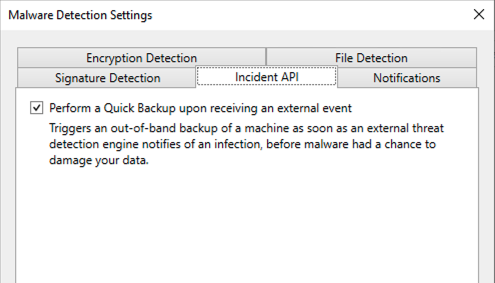
This lets Veeam receive malware intel and act on it
Building the Flow in N8N
This part was surprisingly smooth. Here’s the basic flow:
- Webhook Trigger
Listens for incoming data from the PowerShell script. - Access Token Request
Connects to Veeam’s REST API and grabs an access token. - Trigger Backup + Flag Malware
Sends the intel to Veeam to start a backup and mark the restore point as suspicious.
To get the API calls right, I used the Swagger UI built into VBR. It helped me test the endpoints and grab the cURL expressions, which I then imported into N8N nodes. You can access VBR swagger from veeam console using Main Menu -> Console -> Swagger
Node Breakdown
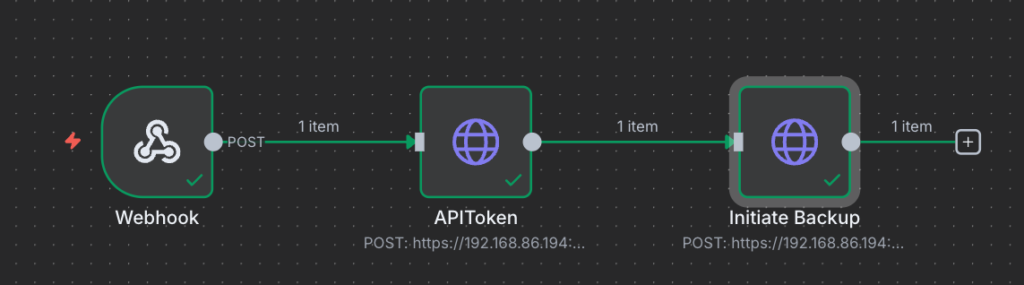
Node 1: Webhook listener
Node 2: Auth request to Veeam
Node 3: Malware event trigger + backup initiation using FQDN and UUID


What’s Next?
It’s a basic integration, but it works. I’m keen to build on it—maybe plug in a SIEM system and use N8N as a lightweight SOAR. That’s a blog for another day. Below video showcase the workflow I ended up with.