
Cross-region copy for Azure VM backuped by Veeam Agents
A quick recap of Part 1
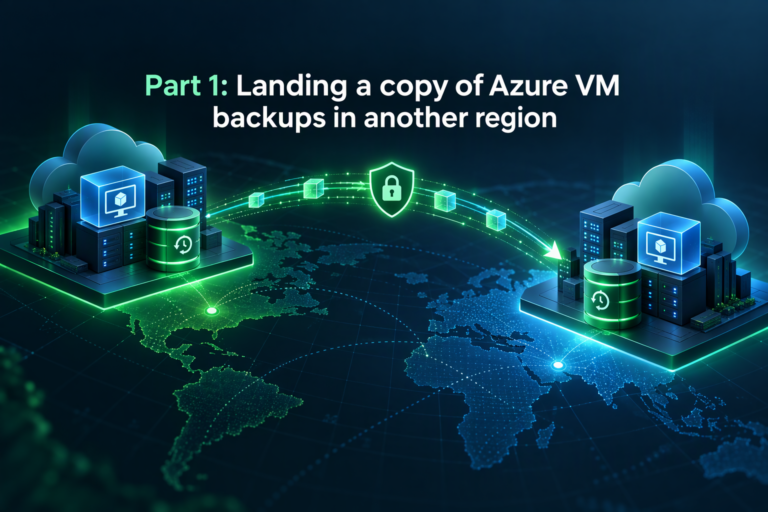
In Part 1 I discussed how placing the gateway server in the target region keeps the backup copy from Vault Advanced to the target object storage inside that region, with no cross-region transfer cost.
Part 2 covers the second scenario: cross-region copy for Azure VMs backedup by Veeam Agents.
Components in the mix
Two components matter in this scenario.
Gateway server. This is the same component from Part 1. It hosts the target data mover and sits between Vault and the target repository during the backup copy. A gateway server can be a Windows or Linux machine.
Mount server. This is the additional component for agent backups. The mount server is where the data mover runs on the source side, so its location decides where the data is read to during the backup copy. Every backup repository has a mount server associated with it. The role is platform-specific: a Windows mount server serves Windows workloads, and a Linux mount server serves Linux workloads.
As in Part 1, placement is what matters. The gateway and the mount server both need to sit in the same region as the target, not next to the source.
Lab topology
The lab builds on Part 1. VBR and Vault Advanced remain in Australia East, and an Azure VM running a Veeam agent is added. The agent is managed by VBR. The gateway server and the target object storage remain in New Zealand North.
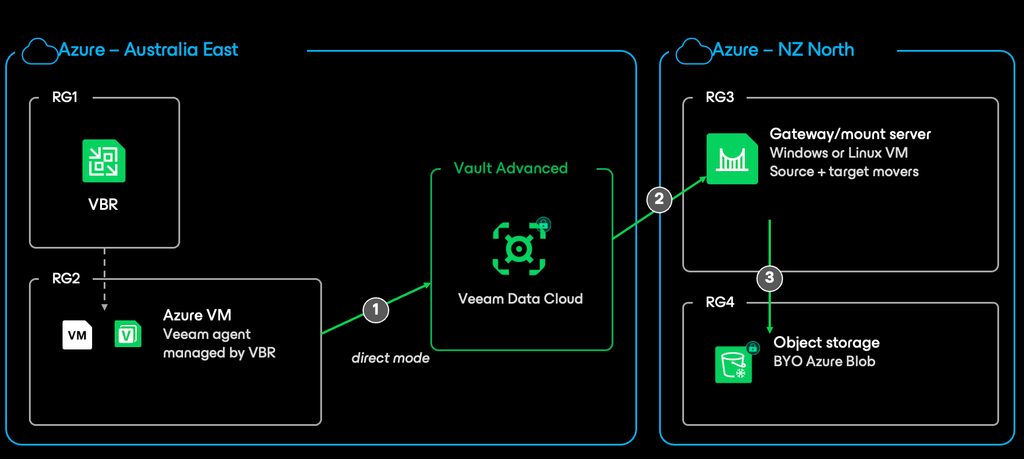
Agent VM: Azure VM in Australia East, protected by a Veeam agent managed by VBR.
Vault Advanced: Australia East, added to VBR as an external repository. The backup lands here directly from the agent.
Gateway/mount server: a single VM in New Zealand North, Windows in this lab. It acts as the gateway for the backup copy and as the mount server for Vault Advanced. A Linux VM can fill both roles for Linux workloads.
Target object storage: Azure Blob storage in New Zealand North, added to VBR as the backup copy target.
The test is the same as before. I ran an agent backup to Vault Advanced, then a backup copy to the New Zealand North object storage, and used the VM metrics to see which machines carried the data.
Test timeline
The backup and the copy ran as two separate jobs, so the VM metrics can be matched to each one by time. All times are UTC, which is also what the Azure metrics charts use.
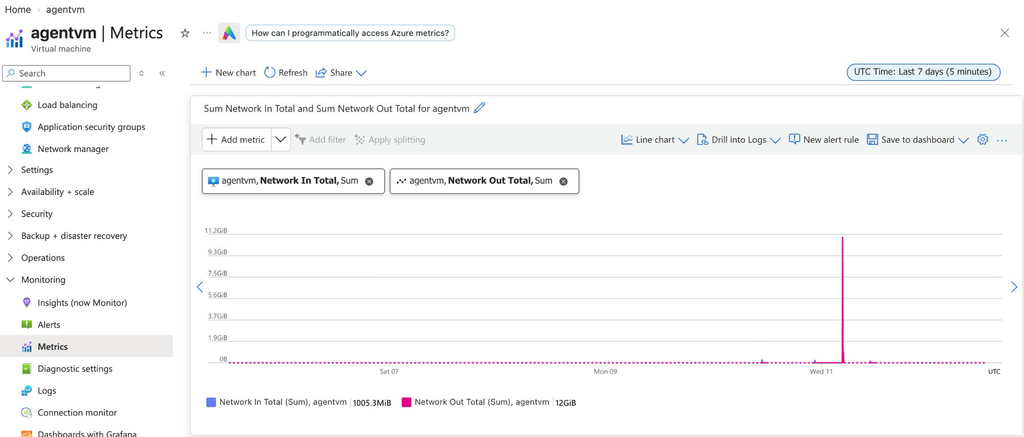
- 4:36 AM, 11 November: the agent backup to Vault Advanced started. The agent VM Network Out spike appears at this time.
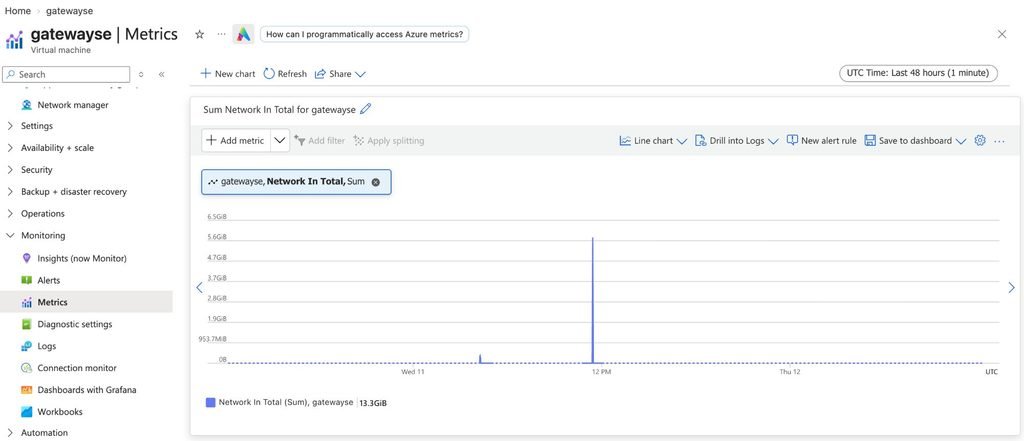
- 11:22 AM, 11 November: the backup copy to the New Zealand North object storage started. The gateway/mount server spike appears at this time.
Because the two jobs ran about seven hours apart, each spike belongs to exactly one job. That is what lets the metrics show which machine carried which transfer.
The agent backup lands straight in Vault Advanced
The agent connects to Vault Advanced in direct mode, so the backup goes from the agent VM straight into Vault, inside Australia East. Nothing needs to pass through VBR, the gateway or the mount server on the way in.
The agent VM sent around 12 GiB over the backup window, which is the backup itself.
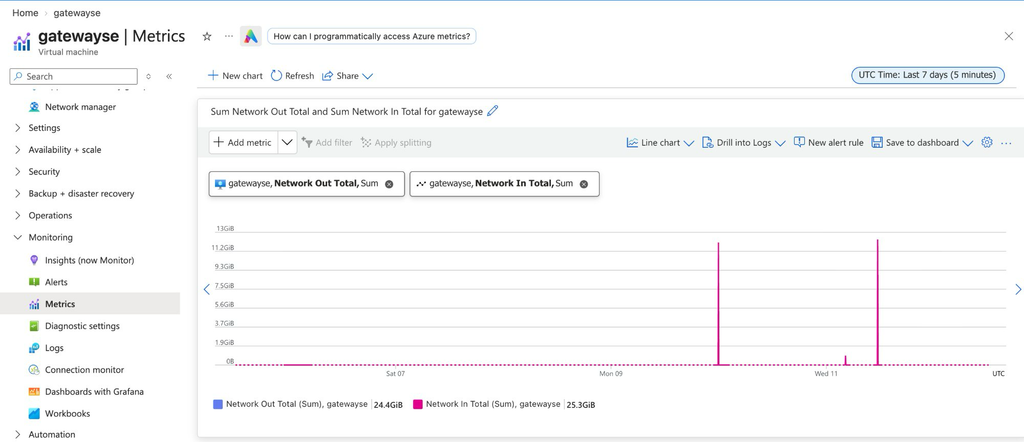
The gateway/mount server in New Zealand North stayed quiet during the backup, apart from one small blip of well under 1 GiB around the same time. This is what we want: the second region carries no part of the backup data.
The cross-region backup copy
This is the part that matters for cost. The gateway server in New Zealand North is also the mount server for Vault Advanced. As in Part 1, the gateway serves the New Zealand North object storage repository. Because the same machine holds both roles, both the source and target data movers run on it, in New Zealand North.
The data is read from Vault Advanced into the VM in New Zealand North, and written from there to the object storage in the same region, without landing in Australia East.
What the VM metrics show
The gateway/mount server VM carried the copy. Over the 48 hours around the test it received 13.3 GiB and sent 12.4 GiB, almost all of it in a single spike at the time of the copy. The seven-day chart below also shows the Part 1 copy.
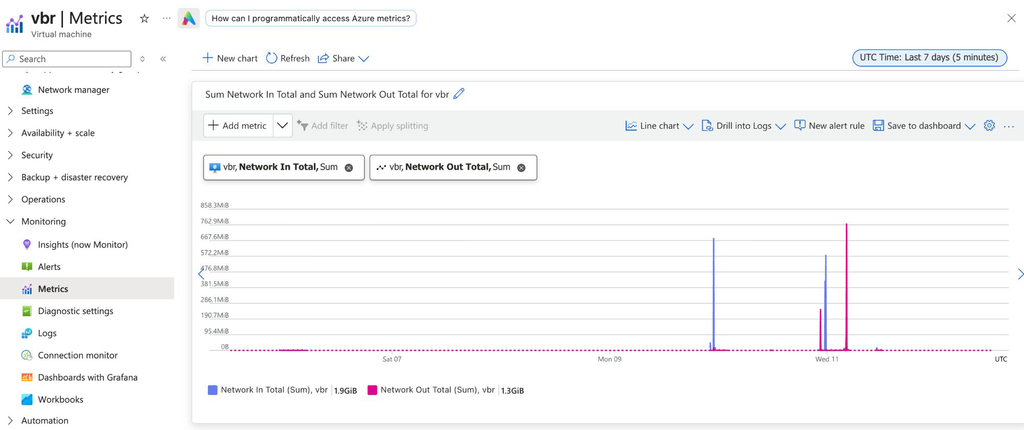
VBR stayed small. Its peaks on the same seven-day chart are below roughly 760 MiB, and none line up with a data-sized transfer. This confirms that VBR only orchestrates the job and does not relay the data.
What about cost
The gateway/mount server VM is the same one used in Part 1. Across both tests, about 24 GiB went out of it, and its Bandwidth charge for the month was AU$0.02. That data went to object storage in the same region, so it is not billed as cross-region transfer. The two cents is most likely small control traffic back toward Australia East.
Gotchas
The mount server does more than the backup copy. The mount server is required for guest OS file restore, application item restore, secure restore, scan backup, Instant Recovery, Instant Disk Recovery, instant file share recovery, and restore of specific objects from file backup and object storage backup. It also runs synthetic operations, repository rescans and health checks for the repository it is associated with.
Its generally recommended to keep mount server in the same site as the backup repository. If it is in another site, the data travels across the network between the sites. In this design the repository is Vault Advanced in Australia East and the mount server is in New Zealand North, so all of the operations above would pull data across regions.
Change the mount server before you perform these actions, so the data does not travel across regions. The mount server is set per repository in VBR, so you can point it at a server in the same region as Vault Advanced before a restore, then switch it back for the backup copy. Consider scripting the switch if needed.
https://helpcenter.veeam.com/docs/vbr/userguide/veeam_data_cloud_mount_server.html?ver=13
Key takeaways
- Agent backups go straight into Vault Advanced in direct mode, so the primary region carries only the backup.
- For the cross-region copy, place the gateway and the mount server in the target region, so the data is read into that region and written to the target storage without returning to the source region.
- Change the mount server before restores, Instant Recovery, scans and similar operations, so the data does not travel across regions. Consider scripting the switch..
- The VM metrics and Cost analysis showed the copy through the gateway and no meaningful cross-region charge in the lab.